2026 · OLX · Console
A/B testing without asking an analyst: OLX Console
OLX's internal analytics platform had housed A/B testing for two years. Nearly half of all experiments were running miscalibrated, and the report meant to surface the results scored 1.5 out of 5 with the PMs who depended on it.
The tool had not failed anyone. It had just never tried to help them.
Outcome
46% → 23%
Experiments miscalibrated at launch
2
Misconfigured experiments caught by the guardrail in week 1
6/6
Analysts signed off on the Advanced Report redesign
1.5 → 4.2
Redesign satisfaction (pre/post survey, 14 users)
Context
A tool that assumed knowledge its users didn't have
Console is OLX Group's internal analytics platform — used by around 100 Product Managers, 150 Data Analysts and 50 Product Designers across markets. The A/B testing module had existed for two years.
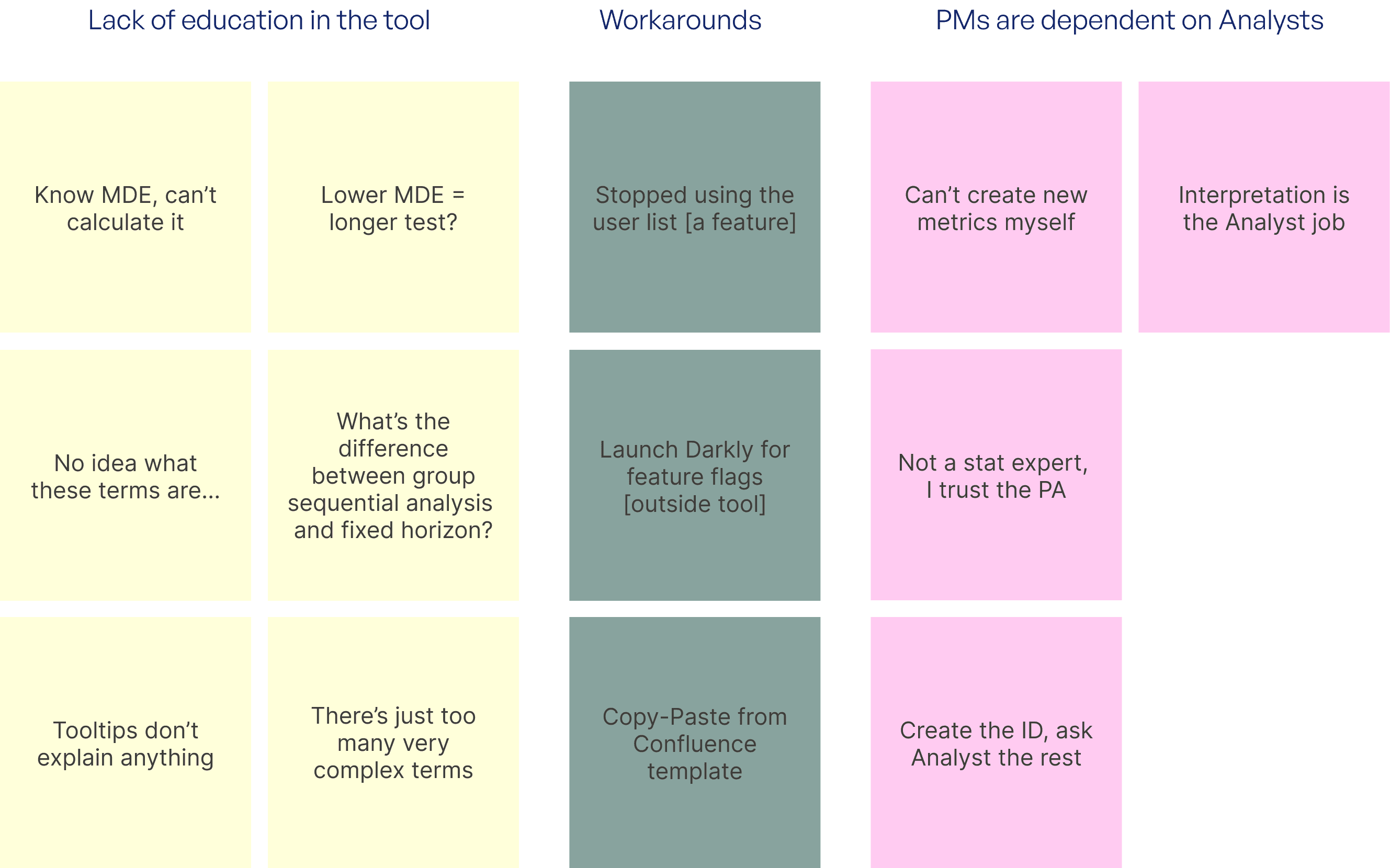
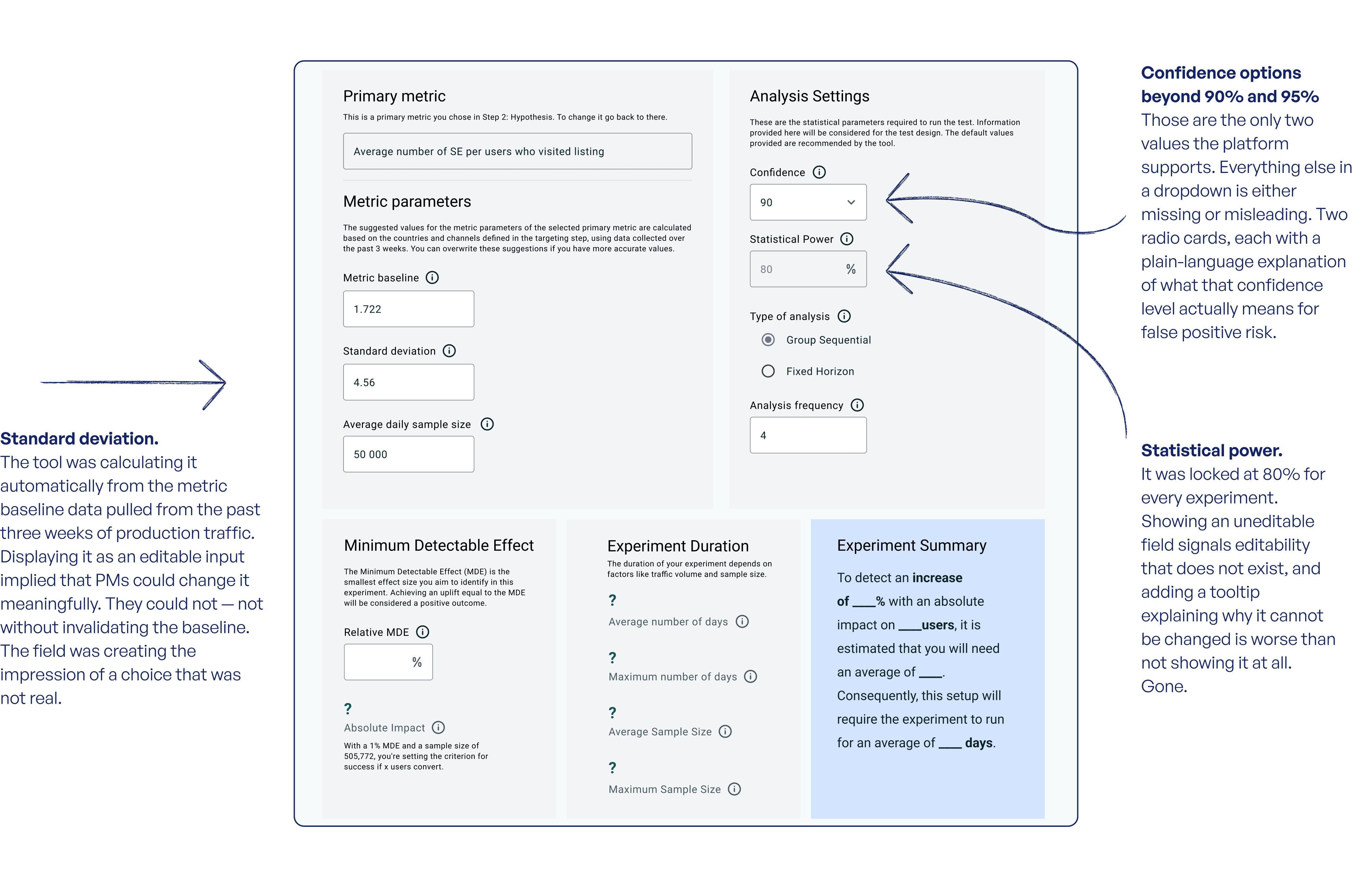
Most PMs had no idea how to correctly set up an experiment. Not from negligence - from a tool that treated statistical fluency as a given. MDE, confidence intervals, group sequential monitoring: these were vague labels, explained in tooltips in technical jargon. PMs were guessing. Analysts were cleaning up after them.
I made an audit that showed it clearly. Across 100 experiments, 46% had been set up with a minimum detectable effect that was either impossibly small or never seriously considered. When I asked 15 PMs what went through their head during setup, the most common answer was some version of: I asked my analyst.
The problem
The setup form was an exam with no answer key
The existing setup form was structured around statistical parameters. Each field mapped cleanly to the methodology. None of it mapped to how a PM thinks about their work.
A PM configuring an A/B test does not think: I need 95% confidence and a group sequential approach. They think: I want to know if this change moves conversion, and by how much would matter to the business. The form had no way to express that. So PMs filled in whatever looked plausible and hoped an analyst would flag the mistake before the experiment launched.
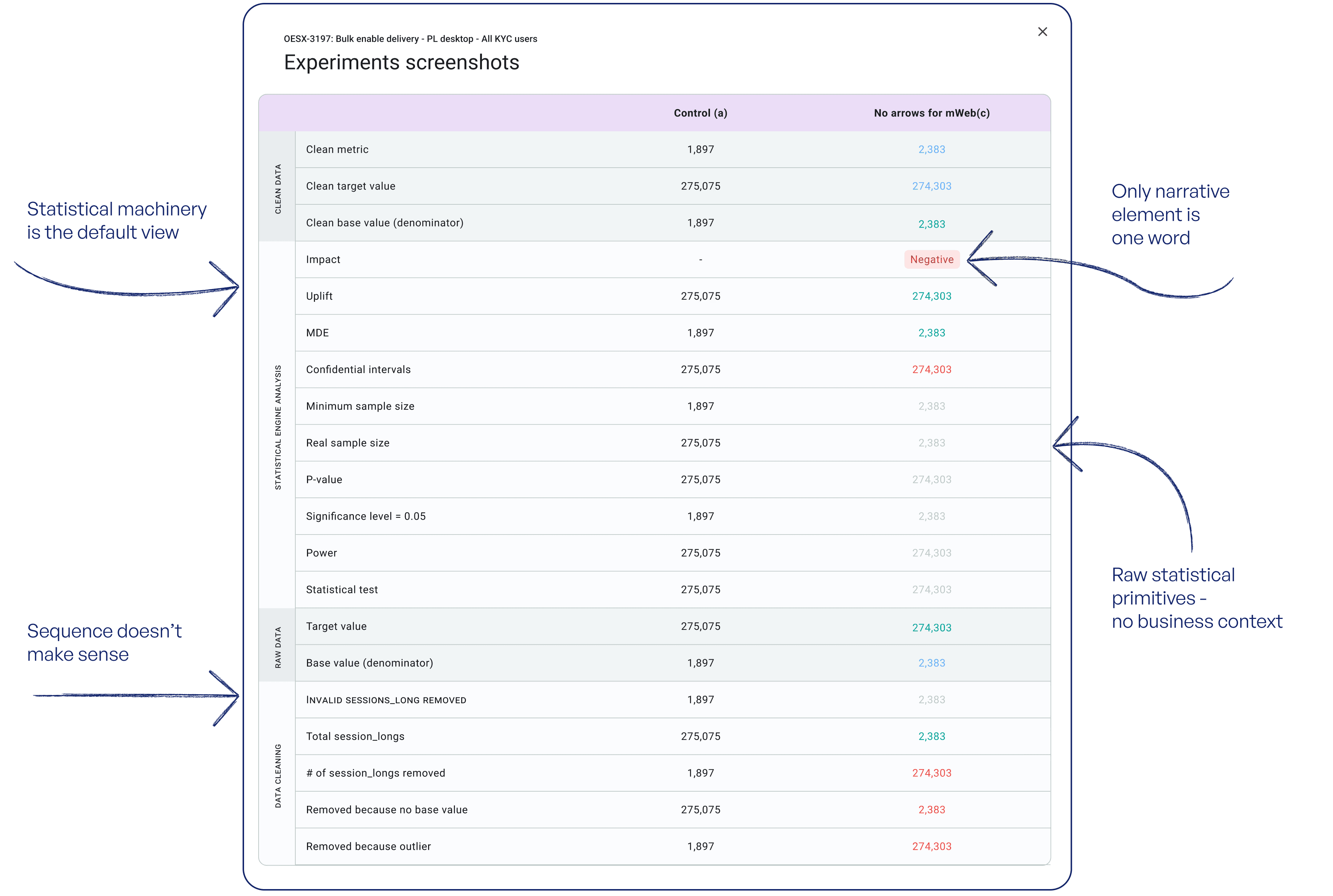
The Advanced Report had the opposite problem. Analysts were used to a list of numbers. PMs found it unreadable. The data was there; the context for reading it was not. Most PMs gave up and were bringing screenshots to analysts to translate.
Two separate problems that looked like a knowledge gap but were actually a design gap.
46%
Experiments miscalibrated at launch
1.5 / 5
PM satisfaction with the Advanced Report
2.3 / 5
PM confidence interpreting results
3.4 / 5
Ease of setting up an experiment
The option we did not take
The fix that would have shipped faster
Along with the team we considered two options.
The first proposal was the obvious one: better tooltips, clearer labels, a glossary inside the form. Weeks of work, not months, and the team was ready to start. I pushed back. You can define MDE perfectly and a PM still won't know what number belongs in their case. The problem wasn't unclear language — the form was asking the wrong question, and a tooltip can't fix that.
So I proposed a third route: rebuild the form around the hypothesis the PM wants to test, and derive the statistics from that. It was the longest to build and the hardest to get agreement on — it hinged on a maths prototype nobody had asked for. The audit numbers and the usability sessions made the case, and we went with it.
What I settled before any design work started
The analysts were not the obstacle to this redesign. Several of them feared we were going to hide or remove the statistical controls they depended on, and that fear was reasonable — “simplified” usually means someone else's needs got cut.
So I named the collapsed panel approach explicitly in those first sessions, before a single mockup existed. The intent was a cleaner experience for PMs. Nothing analysts relied on was being removed. The six-out-of-six sign-off at the end was a confirmation that I'd kept that commitment, not just approval of a design.
The solution
Start with intent, not parameters
The old planning page opened with a grid of statistical inputs. The PM's job was to fill them in correctly before the tool would calculate anything. Most PMs did not know what correct looked like - sometimes they had a very vague idea of what some terms meant.
What we removed, and why
The methodology choice — group sequential versus fixed horizon — was the field PMs most often left on default without knowing what they'd selected. The two are different bets about how an experiment will behave, and the wrong one corrupts both the result and the completion time. It now defaults to group sequential, which fits most cases, and sits in the expert panel where an analyst can change it.
Every cut removed something that created confusion without adding a real choice. The form got shorter; the decisions that remained got clearer.
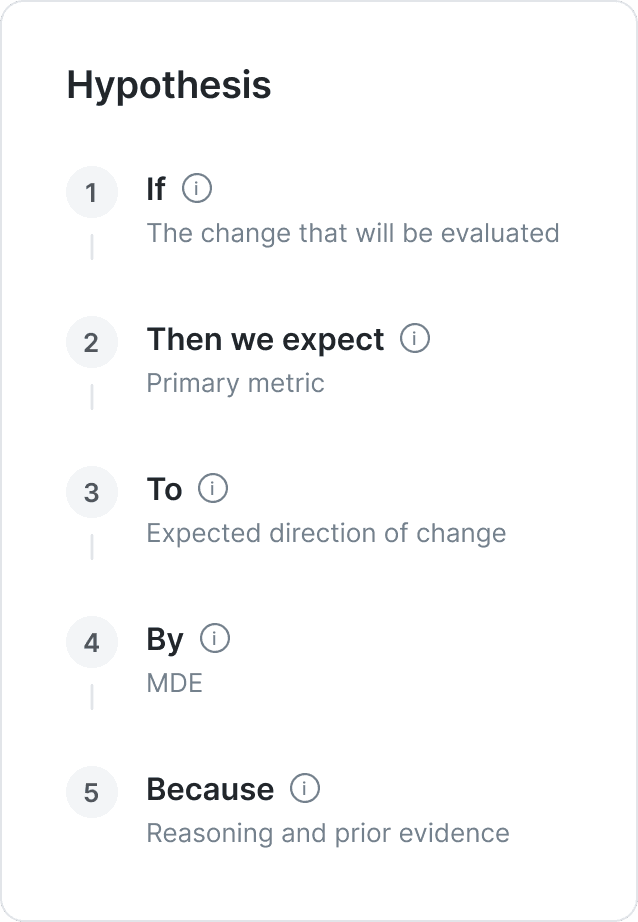
The form in the order a PM thinks
The redesign asks the questions in the order a PM already answers them in their head. Five fields, read as one sentence:
The statistical configuration is derived from those answers. A PM who can finish the sentence has done the meaningful work; the parameters follow from what they said instead of standing in front of it.
Making the consequences visible
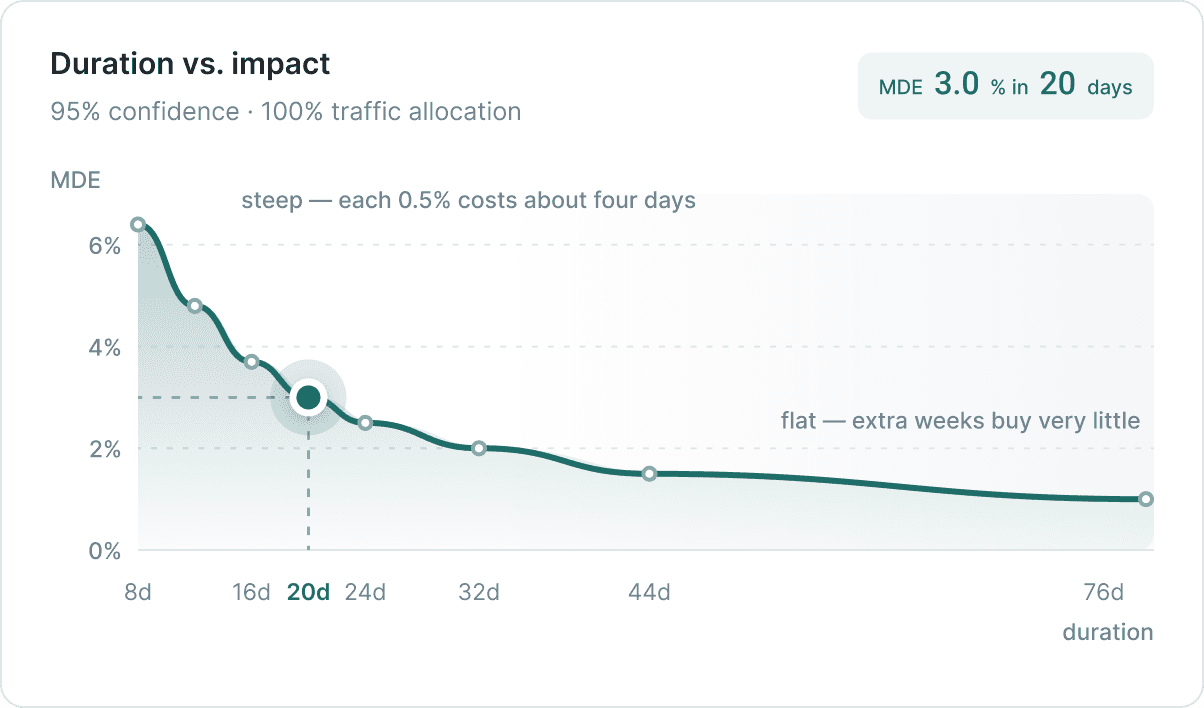
No one could feel what MDE meant. A percentage in an empty field doesn't tell you that 0.5% commits the experiment to eleven weeks, or that 5% makes the result too coarse to act on. The old tool never showed that relationship.
I tried three ways of showing it.
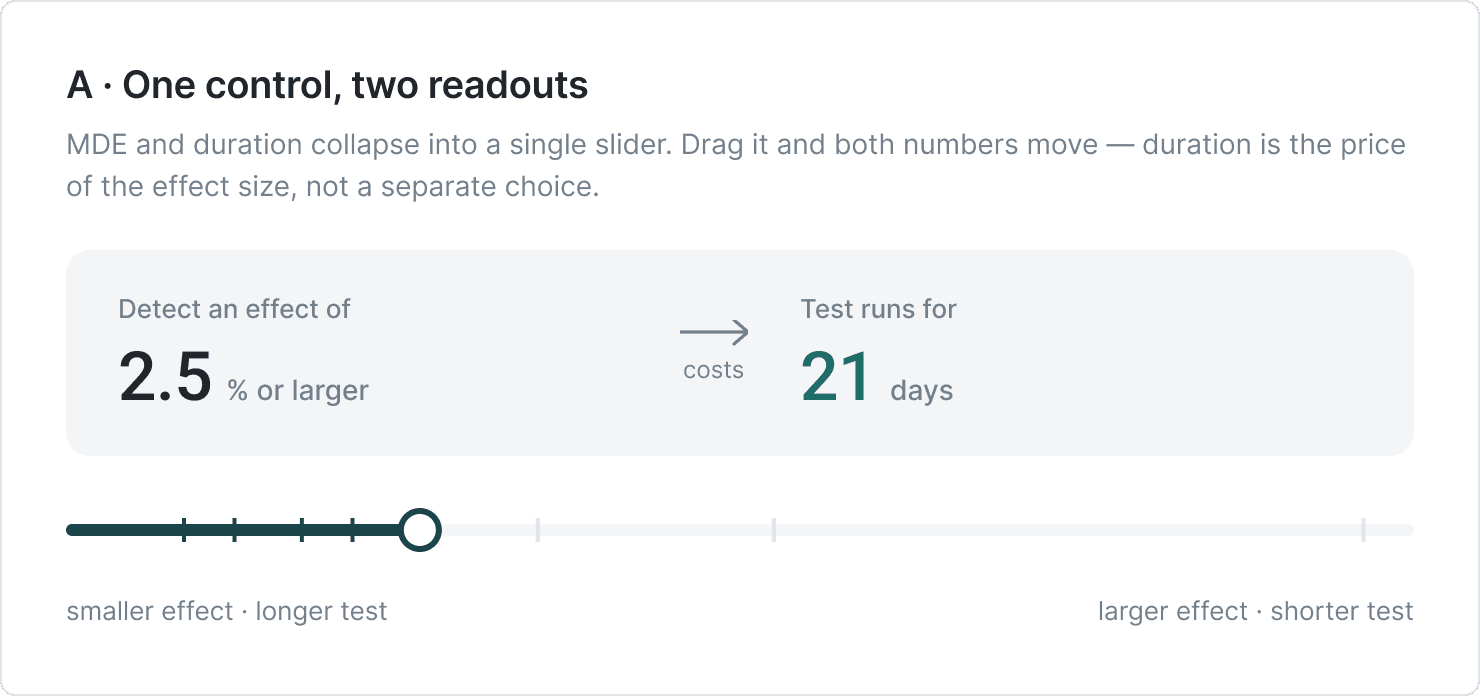
A · One control, two readouts.
MDE and duration collapse into one slider; drag it and both numbers move. Clean, but it made duration look like a second thing you were choosing. Also it was not education enough: didn't show the full scale.
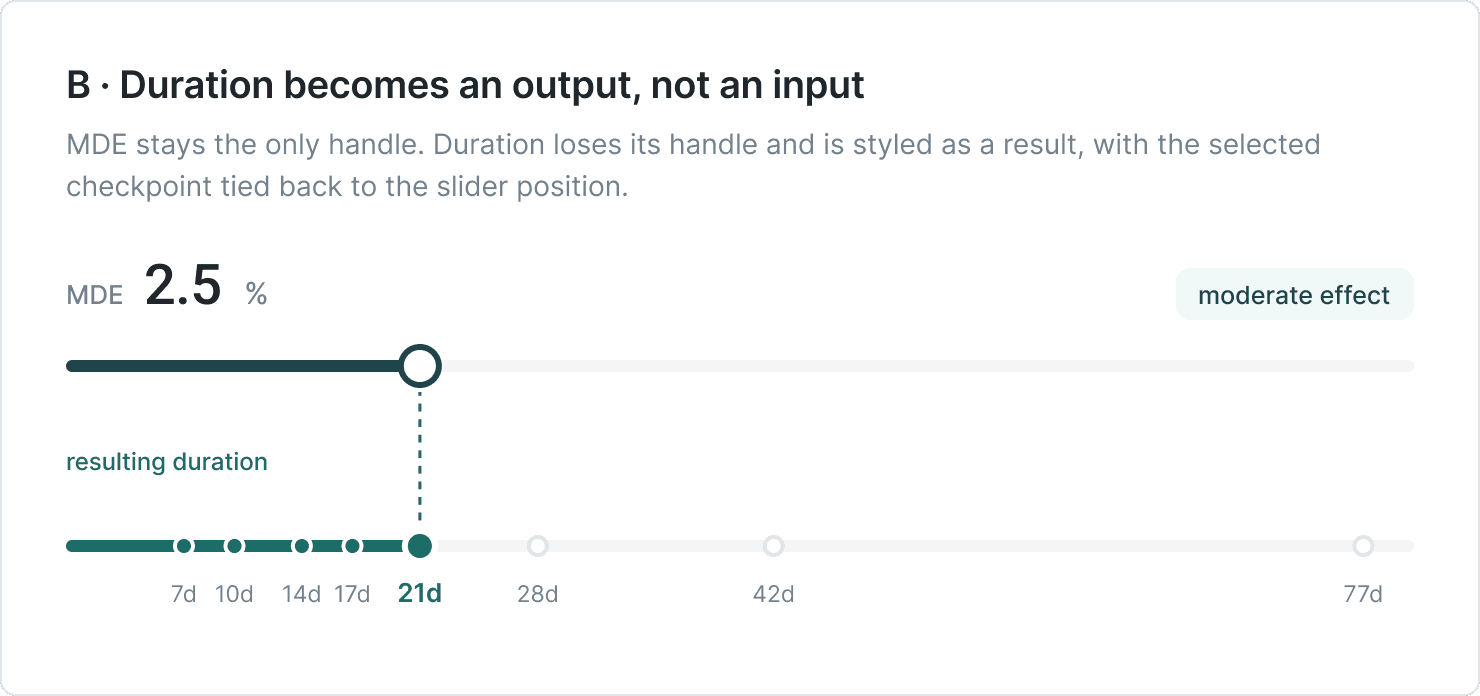
B · Duration as an output.
MDE stays the only handle. Duration has no handle at all — it's rendered as a result, with the checkpoint tied to the slider position and a chip that names the effect size in plain words.
C · The trade-off curve.
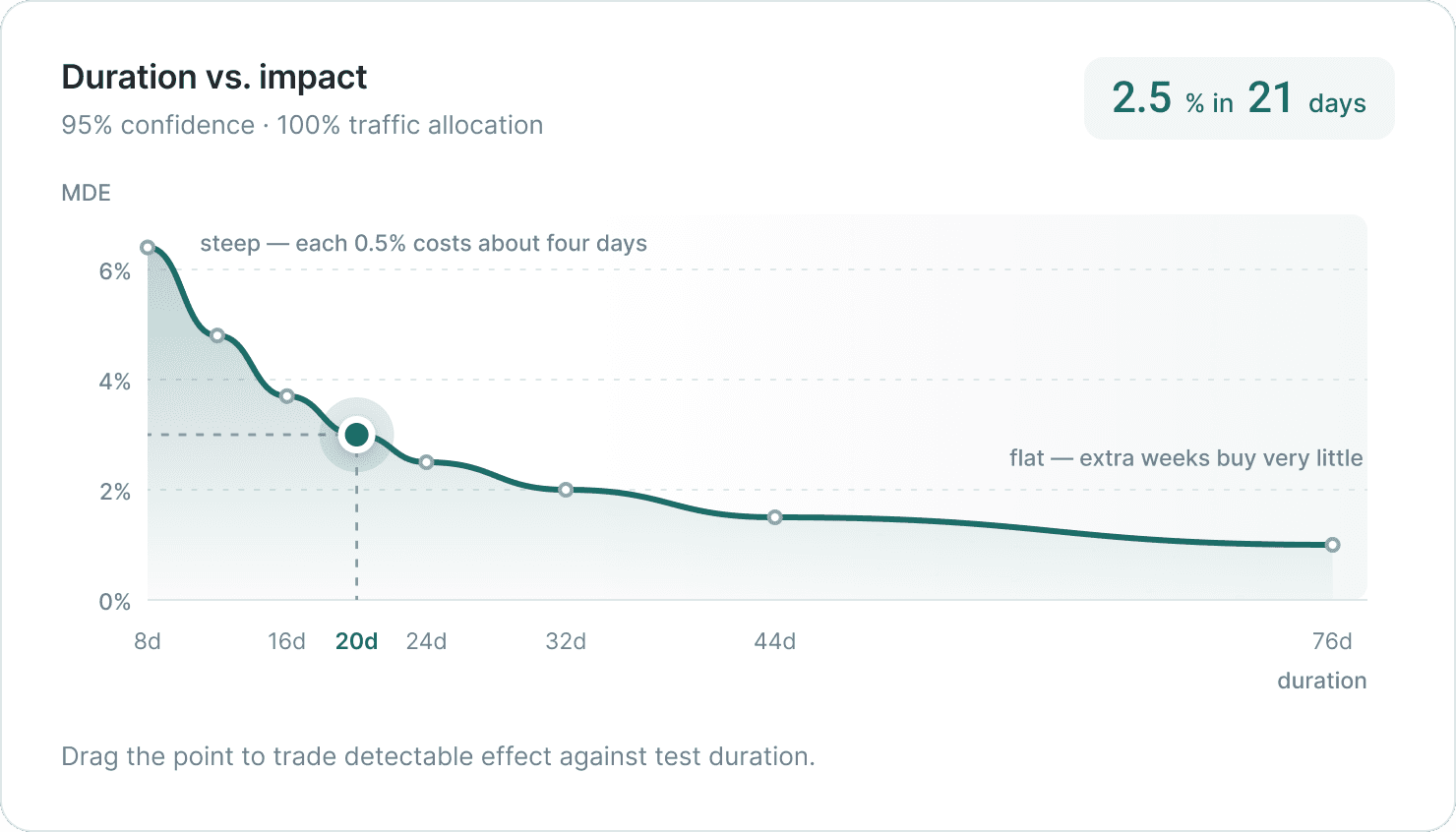
The full MDE-vs-duration curve with a draggable point. It's the clearest explanation of why - you can see where the curve flattens and extra weeks stop buying anything.
C stayed. It's the one piece of the form that teaches instead of asks.
The expert panel, collapsed by default for PMs
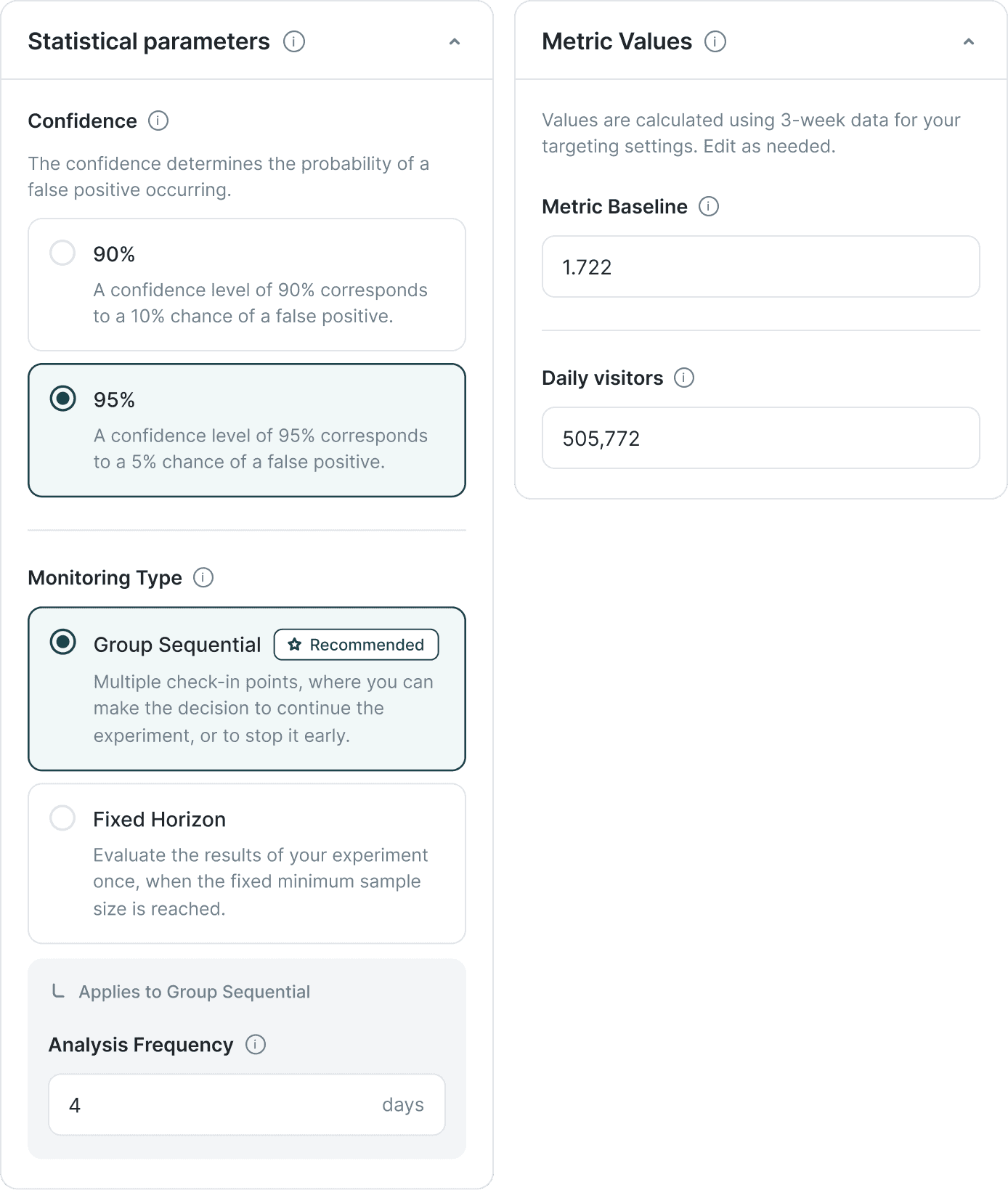
Monitoring type is set to the one with the fastest, but accurate results. Analysis frequency, metric baseline and daily sample size are pre-populated from the historic data and AI calculations. But showing them prominently would imply an engagement most PMs won't have, and shouldn't have.
So the Metric Values panel collapses by default. A PM running a standard experiment almost never opens it. An analyst who wants to override a baseline can, in one click. Nothing is hidden - the interface is making a judgment about who needs what, and when.
What we decided to add
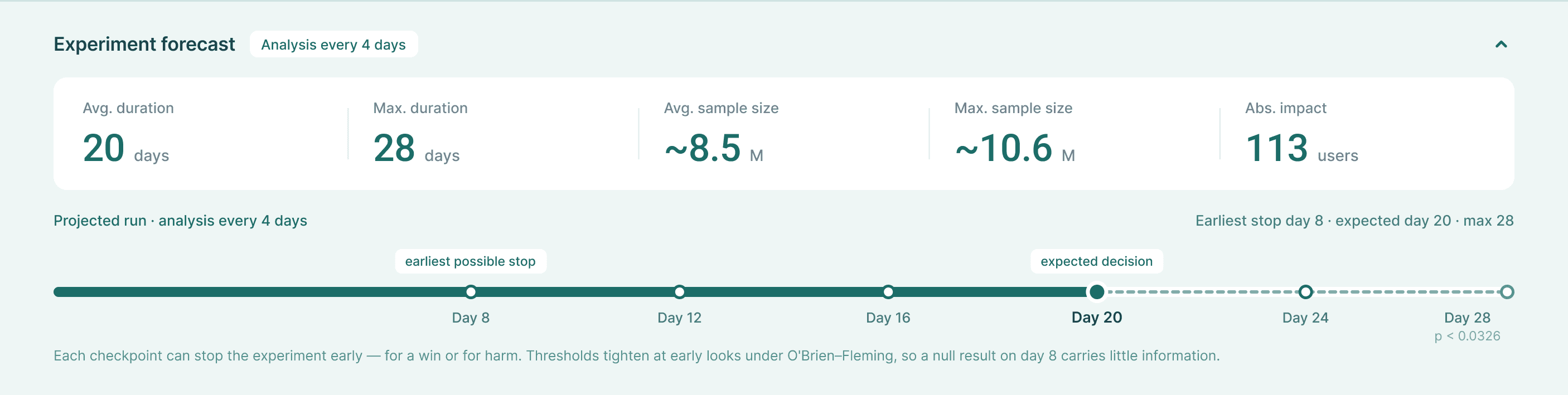
A sticky forecast that responds in real time
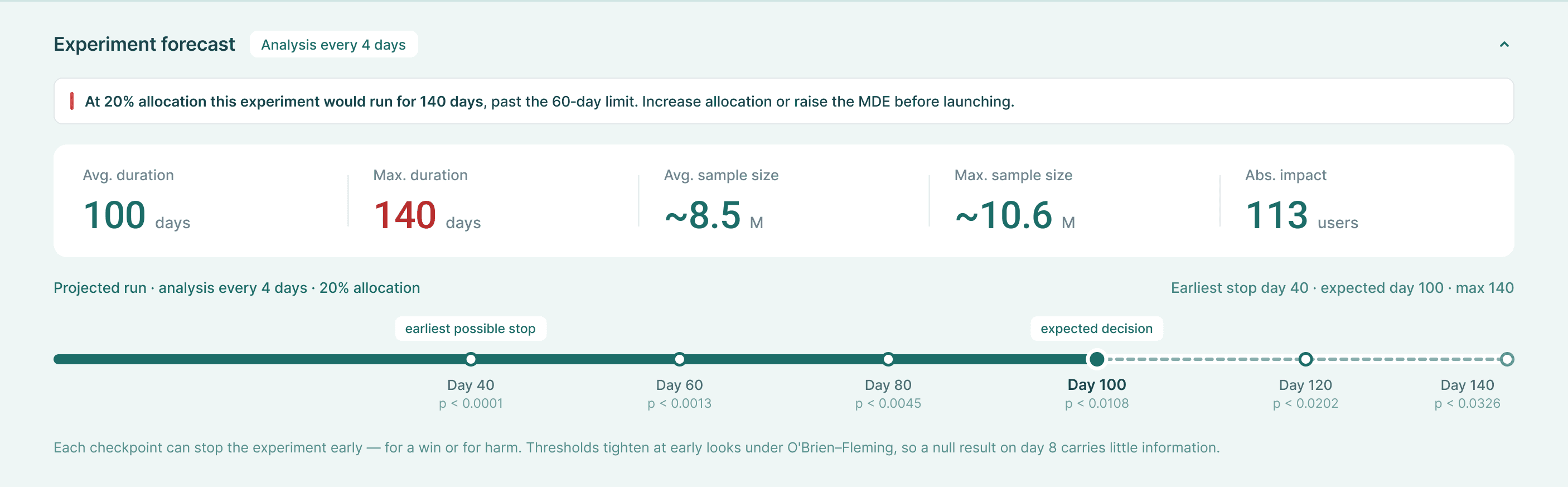
The experiment forecast - duration, sample size, absolute impact — sits in a fixed panel at the bottom of the page and updates as the PM configures. Change the MDE and the duration recalculates. Change the monitoring type and the interim checkpoints redraw. With visuals, user sees the correlation between numbers easily.
It appears only once all five hypothesis fields are complete.
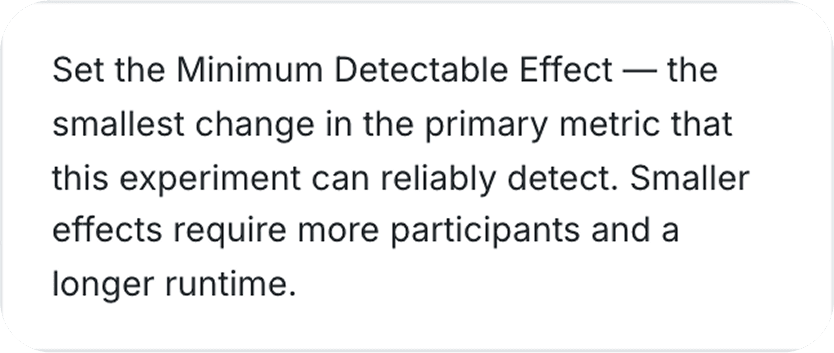

Plain language explanations in the form, not in tooltips.
Research had consistently shown that PMs skipped tooltips — they require an extra interaction at exactly the moment when someone is least likely to take it. Confidence level, monitoring type, analysis frequency: each has a short natural-language explanation visible by default, not behind a hover.
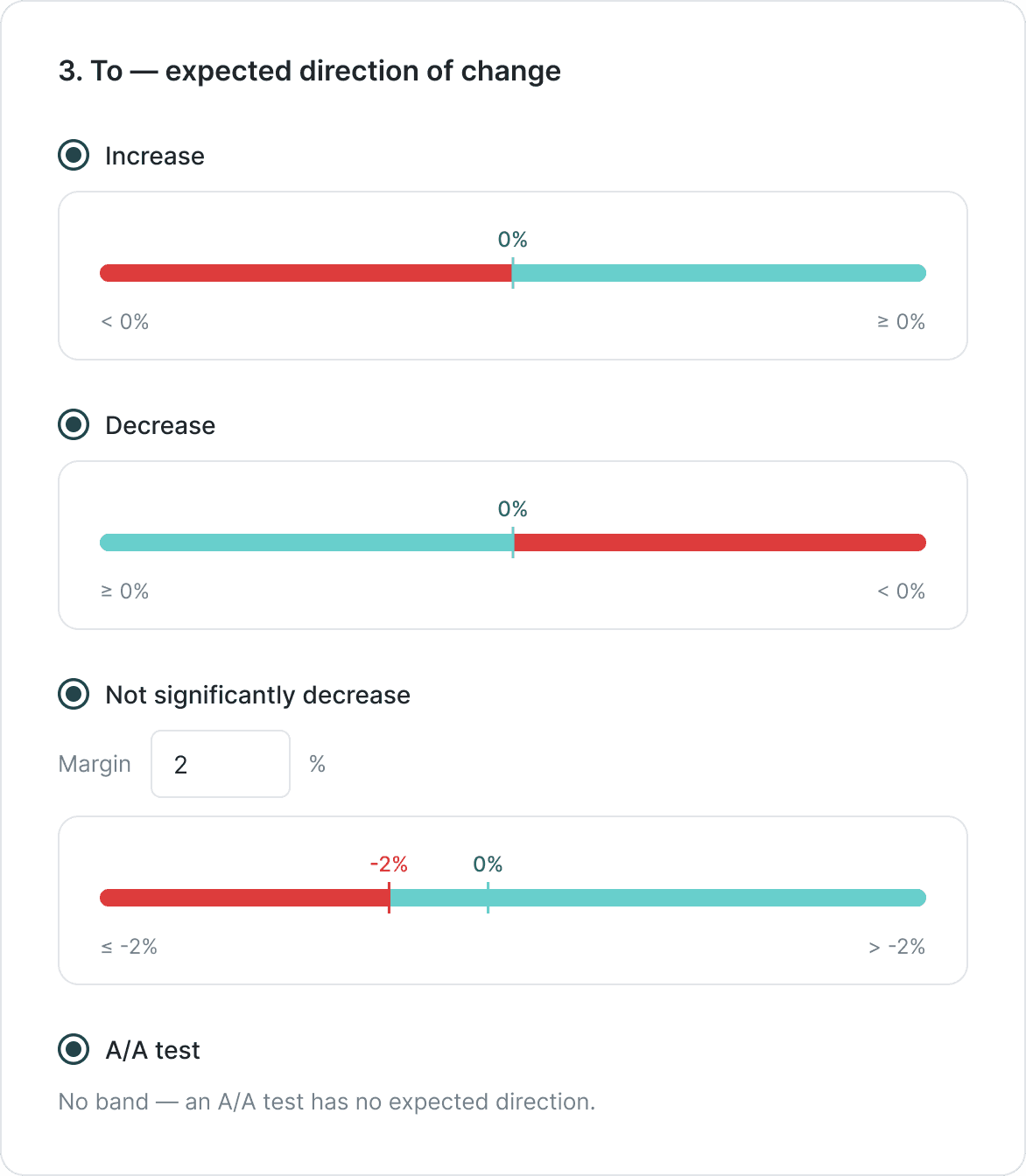
Showing what each direction means
Direction used to be four radio options and nothing else. Now each one draws what it's asking: a band with the threshold marked, red where the hypothesis fails, green where it holds. Not significantly decrease shifts the threshold left and adds a margin field. A/A test removes the band — there's no direction to test.
Three old options and one new (A/A test), each with a visual so a PM sees what they're claiming before they claim it.
Results Interpretation: Testing Report & Metric Report
The old AB Testing Report had no hierarchy. Every metric returned a number — an uplift value, a metric value. No visual indication of whether that number was meaningful or noise, no way to scan the list without opening each row, no differentiation between a result that needed action and one that was still gathering data.
The redesign works at two levels.
Level 1: the Testing report.
Each metric row now includes a confidence interval band alongside the uplift value. The band plots the range of plausible true effects against the relevant threshold — zero for most metrics, -1% for health metrics. A band fully on one side of the threshold is a clear signal. A band crossing it is inconclusive. A PM can scan the full list and see which metrics need attention without opening any of them.
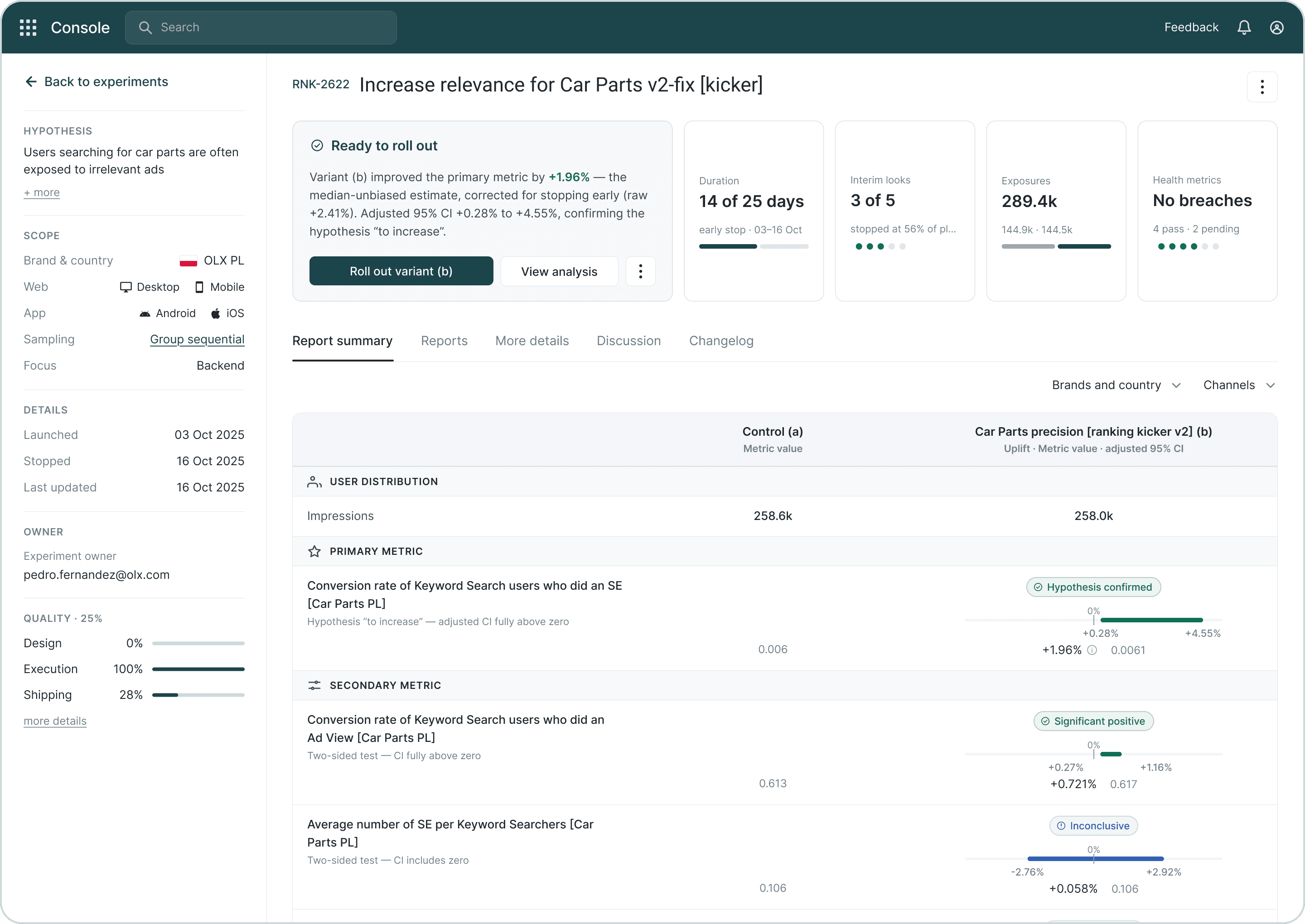
Level 2: the Metric Report.
Four layers, in order of what a PM needs to read.
The principle running through all of it: the visualisation adapts to the hypothesis, not just the data. The CI band shows the right reference point. The verdict explains the right question. A PM does not need to understand any of that machinery. They read the colour, read the explanation, look at the picture, and know what to do next.

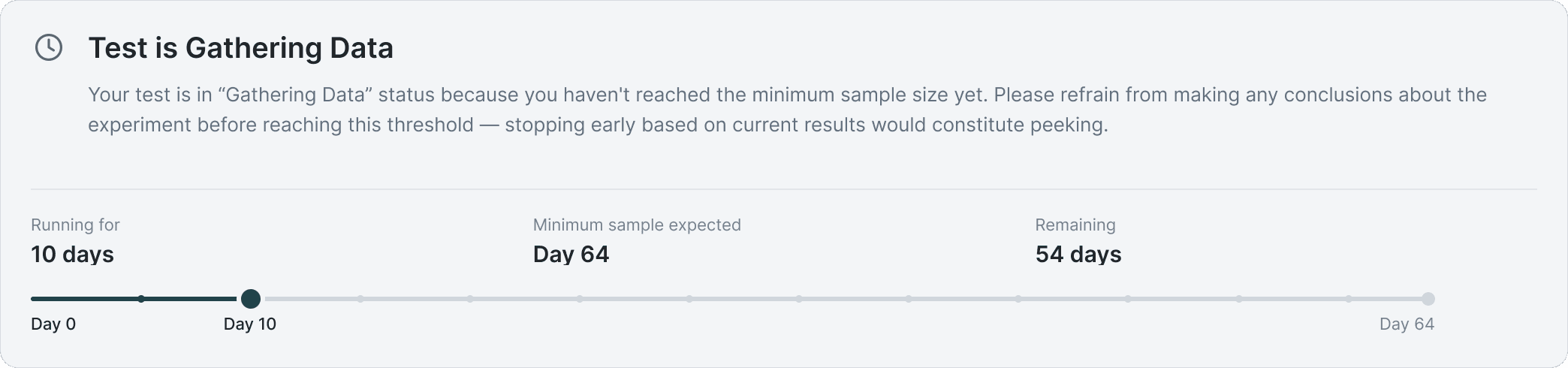
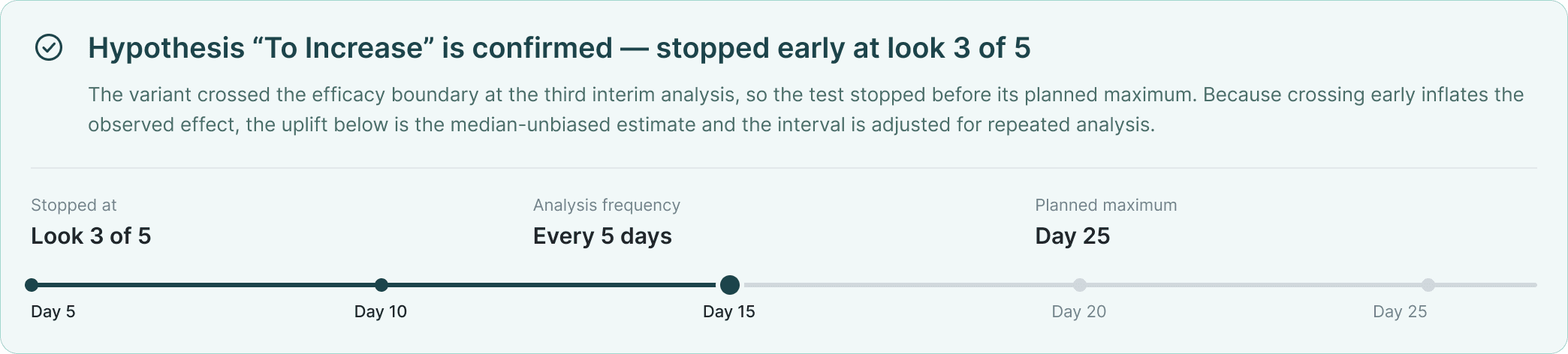


The verdict
A colour-coded banner states the outcome and explains it in terms of the specific hypothesis.
Red means hypothesis not confirmed or statistically significant negative effect.
Green means confirmed.
Blue means inconclusive.
Any metric type can be any colour — what varies is the explanation in the banner text. A "not confirmed" primary and an "inconclusive" secondary have different explanations because the statistical question being asked is different. The explanation is always in the banner, never behind a tooltip — the moment someone is reading a result is exactly the moment they are least likely to click for more information.
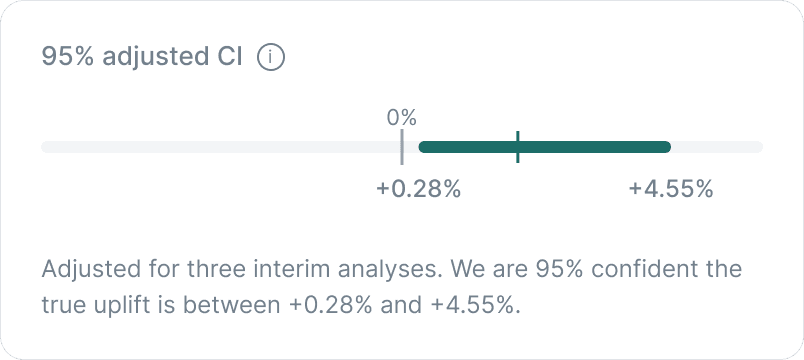
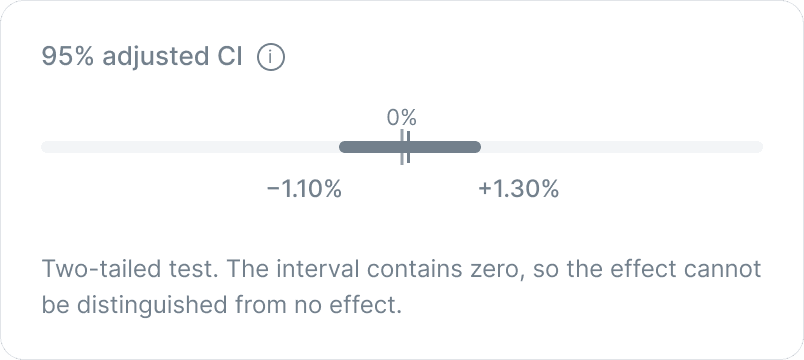
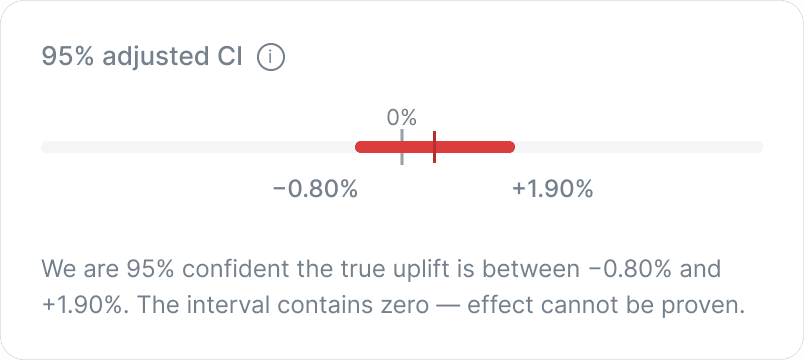
The CI visualisation
The confidence interval is plotted as a band against a reference point, not printed as two numbers in a row. For most metrics the reference is zero.
For health metrics it is -1%, and the visualisation shows both -1% and 0% so the PM can see exactly where the band sits relative to both. An uplift of -0.057% with a CI fully above -1% reads as green — the picture makes it obvious why. A number-only report would have looked wrong to a PM who saw a negative uplift and expected a negative verdict.
The daily chart
Uplift and metric value over time. The trajectory tells a different story than the final snapshot — a technically significant result that is visually noisy across the run is not the same as one showing steady movement in a consistent direction.
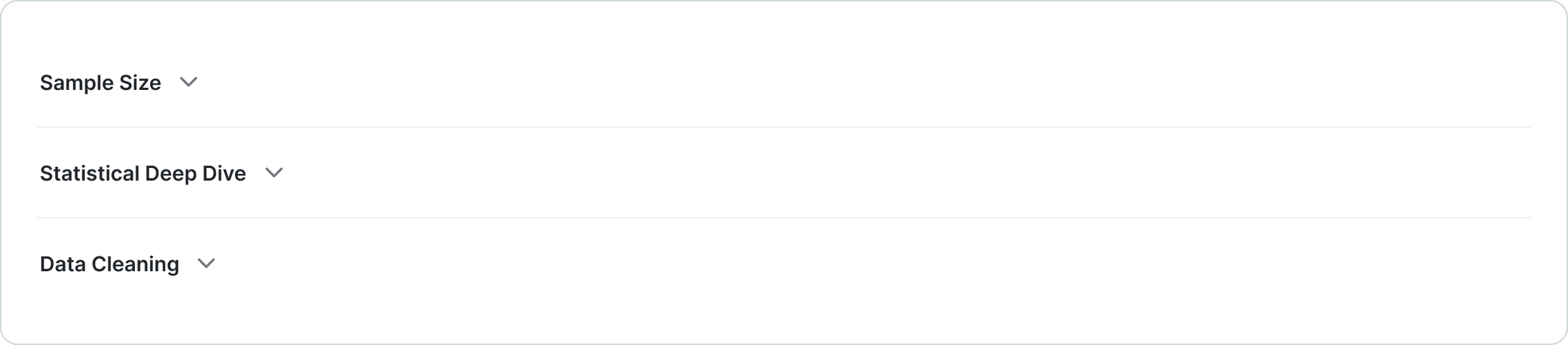
Collapsible sections
Sample Size, Statistical Deep Dive, Data Cleaning. Closed by default. An analyst opens them. A PM does not need to know about session longs removed or winsorization thresholds to decide whether to ship.
Validation
What the testing told us
Fourteen PMs in an unmoderated Maze study. One task: set up a valid experiment for a conversion metric on their market's main checkout flow. Twelve completed it correctly. Two struggled — both on the MDE field, both involving a specific edge case with very low baseline conversion rates. We fixed the edge case. We did not redesign the field.
Six analysts in moderated sessions reviewing the Advanced Report redesign. All six signed off. The concerns that surfaced were about copy precision and statistical terminology — things we updated — rather than e.g. the logic of what was visible where.
And the finding that mattered most
Three PMs said the hypothesis form felt more like explaining themselves than filling in parameters.
They weren't wrong. The framework does ask PMs to articulate what they think will happen and why, which is more than the old form required. Whether that reads as useful scaffolding or as overhead depends on how seriously a team treats experimentation, and not every team in a large organisation sits in the same place on that.
I didn't read it as a design problem. A PM who can't articulate a hypothesis probably shouldn't be running the experiment. But it was worth naming, because the tool raises the floor and educates users.
What changed
Between prototype and ship
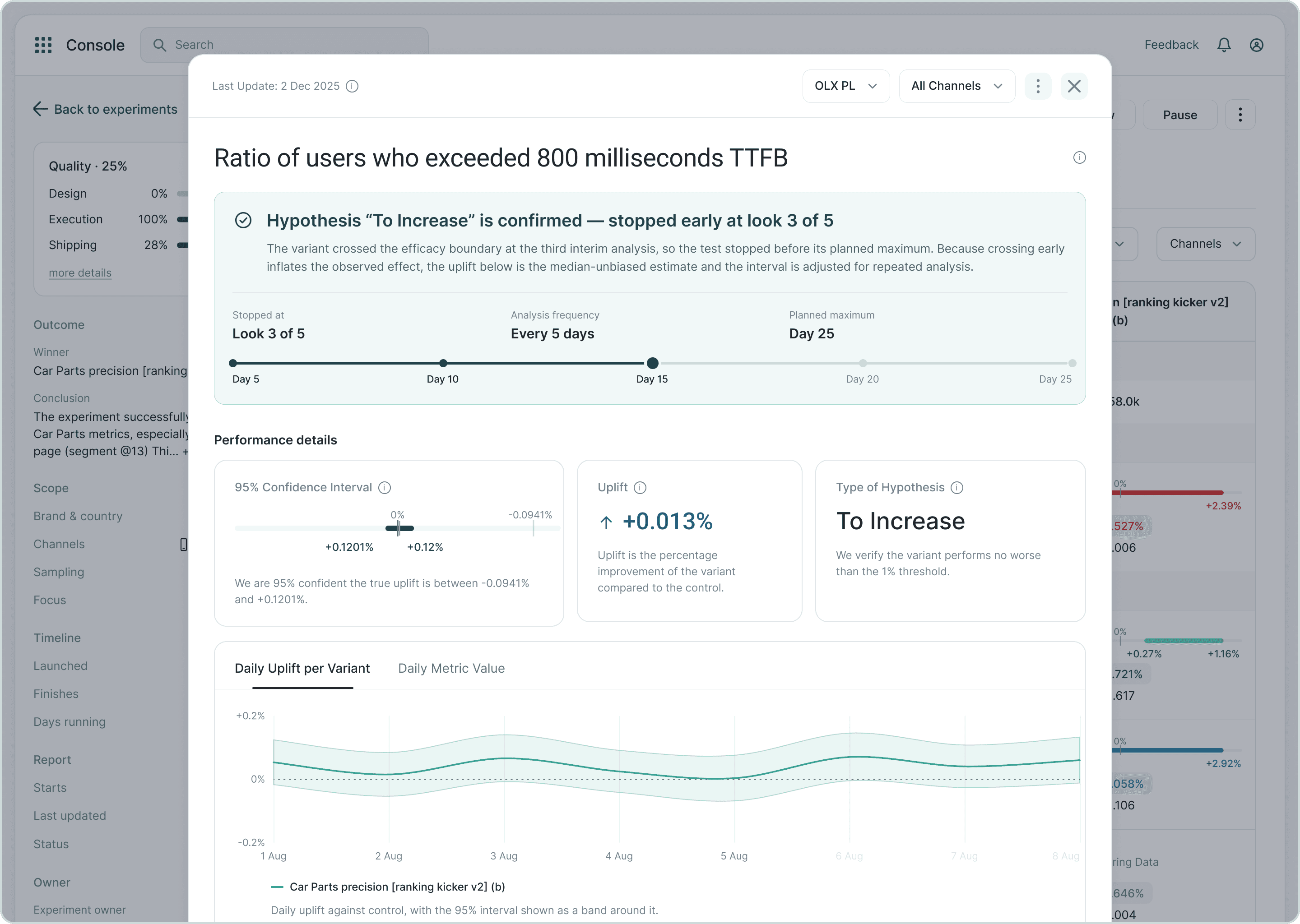
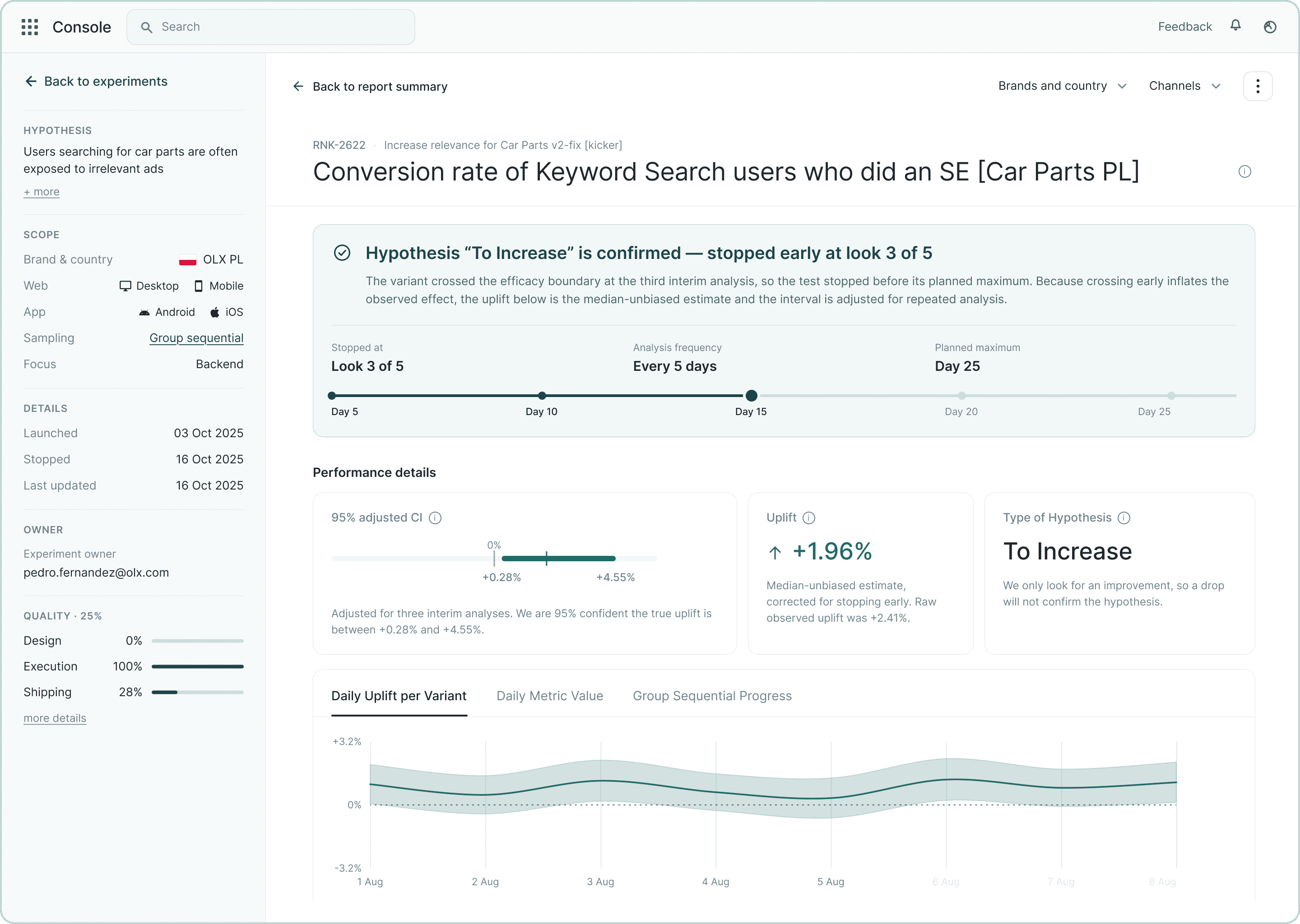
Made the Metric Report full page instead of a dialog
A dialog has no address. If someone wanted a second opinion on a result, they screenshotted it into Slack. A page has a URL, so you send a link and the other person opens the live report rather than a picture of one from three days ago.
The dialog also covered the thing you needed in order to read it. Hypothesis, scope, owner, launch dates were all on the page underneath. Checking how the experiment was set up meant closing the report and opening it again.
And it scrolled inside a page that already scrolled, so long reports were awkward to move around in.
Added an empty state to the experiment forecast.
In the first prototype the forecast panel only appeared once all five hypothesis fields were complete. PMs didn't know it existed until it showed up, and when it did, it surprised them. The panel is now visible from the start, the five fields are shown as a checklist that ticks off as they go. PM knows what's coming and what's left.

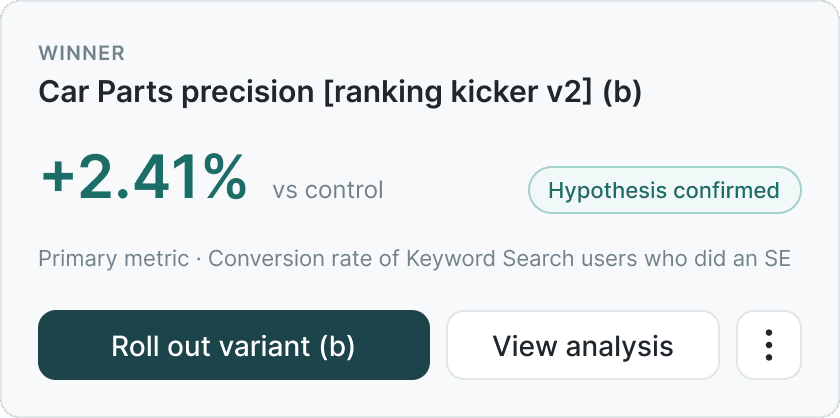
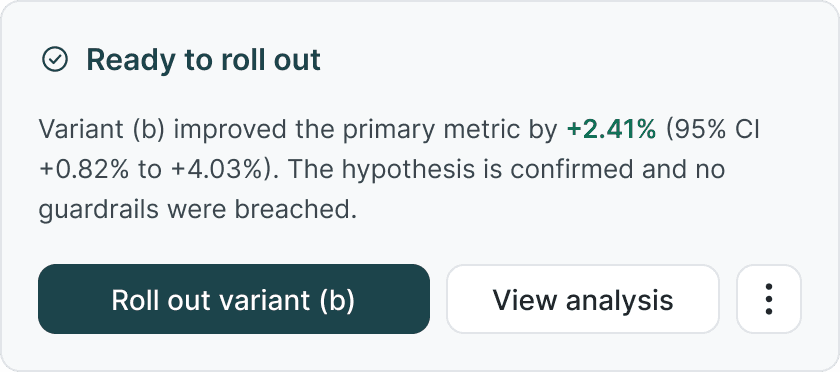
Replaced the headline-number verdict with a sentence.
The prototype led with the uplift: "+2.41% vs control", a "Winner" label and a "Hypothesis confirmed" pill. It looked decisive and it was redundant — three labels saying one thing, and the number arrived before the PM knew whether it was good. We put two alternatives in front of users: the same card built like the stat tiles (C), and a plain sentence (B). C read as one system but the verdict became a subline under a headline. B won the test: the decision in three words, the evidence in one sentence with the confidence interval inline, nothing to decode. That's what shipped.
Added a traffic allocation guardrail.
If the allocation would push the timeline past a threshold, a warning appears before the PM can submit. The data science team asked for this explicitly. It caught two misconfigured experiments in the first week after launch.
Impact
46% → 23%
Experiments miscalibrated at launch
2
Misconfigured experiments caught by the guardrail in week 1
1.5 → 4.2
Redesign satisfaction (pre/post survey, 14 users)
2.3 → 4.4
Confidence interpreting results (pre/post survey, 14 users)
3.4 → 4.5
Ease of setting up an experiment (pre/post survey, 14 users)
Reflection
What I would do differently
- The Maze study showed 12 of 14 PMs could set up a valid experiment in a controlled task. Whether they do it in production, with real deadlines and no task prompt, is a different question. The miscalibration rate we report was pulled by hand from launched experiments after ship. Next time I'd define the events with data science before launch — experiments set up without an analyst, guardrail fires, MDE values chosen, expert panel opens — so the answer is in the tool from day one and keeps updating.
- Pilot before rollout. Twelve of fourteen in Maze is a controlled task; a two-week pilot with three PM teams before turning it on for 100 would have caught the production edge cases the guardrail later found.
- I underestimated how much statistics I'd need before I could design anything. The first week went on group sequential testing, MDE and power, mostly with the data scientists, and it wasn't in the plan. It was also the reason I could push back on the tooltips option with confidence rather than instinct. Next time I'd budget that time.